
Add a blurred backdrop without changing your photo
Pixpie blurs a duplicate of the whole image and places it behind the clear original to fill empty canvas space. It does not detect or blur objects inside your photo.
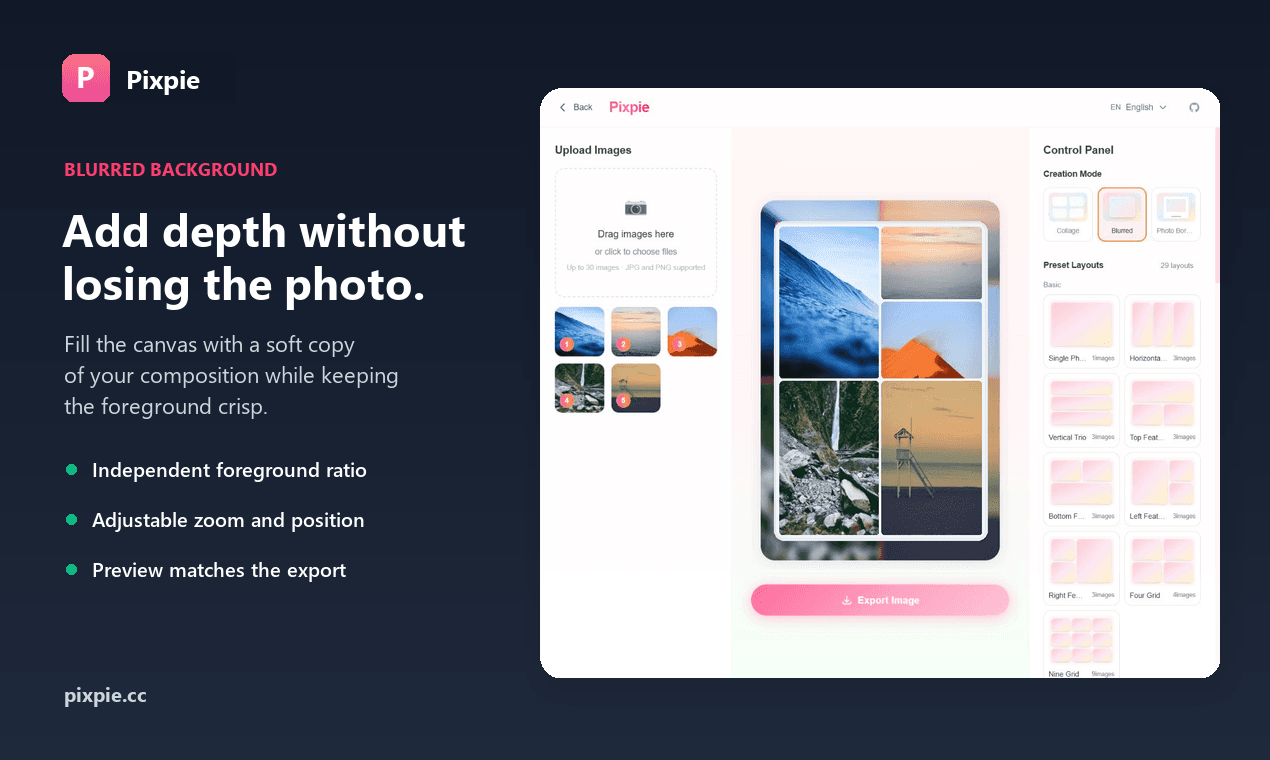
Keep the whole photo
The backdrop is blurred, not the background inside your photo
The blurred layer is a second copy of the complete image. The clear original sits above it and can be resized or repositioned independently without changing its contents.
A blurred copy fills the canvas
The complete image is duplicated and softened to create the backdrop; no subject detection is involved.
Precise scale and position
Move and zoom the foreground until the subject sits exactly where you want it.
Matching preview and export
The high-resolution PNG keeps the same crop, spacing, and blur shown in the editor.
Simple workflow
Create it in three steps
Everything runs locally in your browser. There is nothing to install and no account to create.
- 1
Add your photo
Choose a JPG or PNG from your device.
- 2
Create the blurred backdrop
Pixpie duplicates and blurs the complete image behind the clear original.
- 3
Refine and export
Adjust ratio, zoom, position, and blur, then download an HD PNG.
Your photo stays on your device
Pixpie reads and processes the image inside your browser. It is not uploaded to our server.
Questions
Before you start
Will Pixpie upload my photo?
No. Photo processing happens locally in your browser, and Pixpie does not receive the image.
Does Pixpie detect and blur the background inside my photo?
No. Pixpie does not segment people or objects. It blurs a duplicate of the complete image and uses that copy as a backdrop behind the clear original.
Do I have to crop the foreground?
No. You can preserve the complete photo, choose a foreground ratio, and adjust its scale and position independently.
Which image formats are supported?
The editor supports JPG and PNG images and exports a high-resolution PNG.
Does the exported image have a watermark?
No. Pixpie exports the finished image without a watermark.
Add a soft blurred backdrop to your photo
Start with the blurred background mode already selected.